Incident Response and Vulnerability Management for Security+
IR lifecycle, forensics hygiene, threat hunting basics, and a practical vulnerability management loop aligned with SY0-701 Domain 4.
Domain 4 on SY0-701 is where security theory meets operational reality. Two programs run in parallel across every mature organization: vulnerability management finds and closes weaknesses before attackers exploit them; incident response handles the breach when prevention fails anyway. The exam does not ask you to run a SOC shift, but it expects you to recognize which phase of which process a scenario describes—and to avoid the traps that confuse scanning with pen testing, containment with eradication, or a compliance notification deadline with an IR milestone.
This post walks through both lifecycles with enough depth to answer scenario questions, plus forensics hygiene and threat hunting concepts that appear under the same domain umbrella.
Why these two programs belong together
Vulnerability management is proactive and cyclical. Incident response is reactive and linear, at least until the next incident starts the cycle again. In practice they feed each other: post-incident root cause often reveals a missing patch, a misconfiguration, or a detection gap that vulnerability management should have closed. Conversely, a critical CVE with active exploit code on an internet-facing server may trigger an emergency IR workflow if exploitation activity is already visible in logs.
The exam occasionally places both in a single stem—"after the incident closed, the team noticed the same service had an open critical finding from last quarter's scan"—and asks what program failed and where. The answer is vulnerability management: the finding existed, remediation lagged, and the attacker found it first.
The vulnerability management loop
Think of vulnerability management as a closed loop, not a one-time project. It moves from discovery through scanning, analysis, remediation, and validation—and then circles back. Each stage has a right answer and a tempting shortcut.
Discovery is where many programs fail before they start. You cannot protect assets you do not know exist. Network scanning, agent-based inventory, cloud asset APIs, and CMDB reconciliation together paint the picture; any single source alone misses a category. Shadow IT—departments spinning up SaaS tools or virtual machines without security review—is a recurring exam scenario because uninventoried assets never enter the scan queue. When a database turns up on the internet with no CMDB entry, the correct first step is not "patch the database" but "assign an owner." Without accountability, patches and exceptions have no one to approve or track them.
Scanning generates the raw findings. Authenticated scans log in to the target and surface issues visible only after login; unauthenticated scans miss a large portion of the risk landscape. A stem stating "zero critical findings on the web server" is not confirming the server is safe—it may mean the scan never authenticated.
Analysis adds context to raw CVE scores. A CVSS 9.8 on an air-gapped internal lab is materially different from the same score on a payment gateway with known exploit code in the wild. Risk-based prioritization weighs exploit availability, asset criticality, network exposure, and compensating controls that may reduce urgency. The exam frequently presents two critical vulnerabilities arriving on the same day and asks which to address first. The right answer justifies priority with business impact and exploitation likelihood—not CVSS alone.
Remediation may mean patching, configuration hardening, network segmentation, or compensating controls when patching is impossible. Legacy OT systems that vendors certify only once a year are the canonical constraint. Risk acceptance is valid when remediation cost genuinely exceeds risk, but the exam expects a documented decision with a named owner and a review date. Perpetual acceptance without expiry is a governance failure dressed as a control.
After remediation, rescan to confirm the fix closed the finding. Report results in risk language that business stakeholders can interpret—"we reduced the external attack surface on payment infrastructure"—not a spreadsheet of CVE IDs.
The incident response lifecycle
CompTIA defines a six-phase IR process, and the exam rewards candidates who can recognize which phase a scenario is describing—not just recite the sequence in order. The phases run: Preparation → Detection and Analysis → Containment → Eradication → Recovery → Lessons Learned.
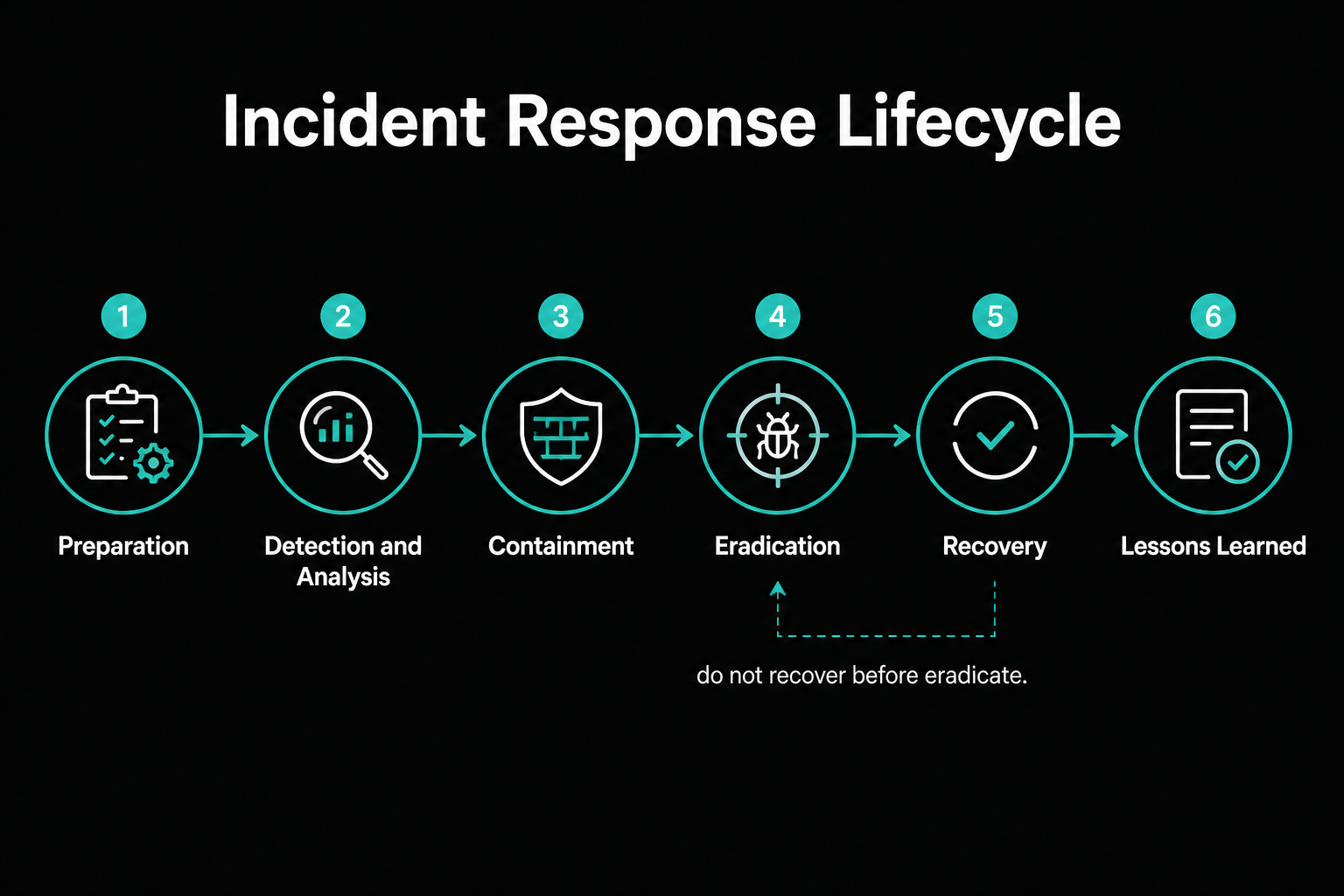
A brief note on IR frameworks: SY0-701 tests this phased model, and exam answers should match its vocabulary. NIST SP 800-61 Rev.3—published in 2024—reorganizes its guidance to map IR activities into the NIST Cybersecurity Framework 2.0 functions (Govern, Identify, Protect, Detect, Respond, Recover). In practice the same activities appear in both frameworks; for exam answers, follow CompTIA's six-phase language rather than CSF function labels to avoid label-mismatch penalties.
Preparation: the investment nobody sees
Preparation happens before any incident touches the environment. It includes documented playbooks, contact trees covering legal, PR, insurance, executive leadership, and law enforcement liaisons, validated forensic tooling, evidence-handling procedures, and tabletop exercises that surface decision gaps before real attackers do. Discovering during a tabletop that no one has authority to authorize taking the production e-commerce site offline at 2 a.m. is a preparation finding. Assigning that authority with a named decision maker and a backup is a preparation action. Finding it during live ransomware is a containment crisis.
The weak path is treating preparation as a documentation project. A playbook nobody has read and a contact list nobody has tested is paper, not readiness. The strong path is exercised, reviewed, and updated at a cadence that keeps it current with the environment.
Detection and analysis: confirm before you act
Detection comes from SIEM alerts, EDR telemetry, user reports, threat intelligence feeds, and anomaly detection. Analysis confirms whether an alert represents a true incident, determines scope, and identifies affected systems and data—before anyone takes disruptive action. An IDS alert firing is detection, not a containment trigger. The next step is analysis: correlate with other log sources, rule out a false positive, and establish scope. Isolating a host before you understand whether it is patient zero or a late-stage victim may scatter your forensic trail and alert the attacker to close their access before you map the full campaign.
Useful sources during analysis include SIEM correlated events, EDR process and file telemetry, identity logs showing authentication anomalies and privilege changes, DNS and proxy logs showing C2 beaconing, cloud audit trails showing unexpected API calls, and email gateway logs if phishing was the initial vector. The weak path is acting on a single alert without correlation. The strong path is building a scope picture first: how many systems, which accounts, what data may have been reached.
Containment: stop the bleeding
Containment limits damage without necessarily removing the threat. Isolating a host from the network, blocking a C2 IP or domain at the firewall, disabling a compromised account, and quarantining a VLAN are all containment actions. The distinction from eradication is intentional: containment is "stop the spread," not "clean the environment."
EDR detects lateral movement from a workstation in the finance VLAN. Network isolation of the workstation keeps memory artifacts intact for forensics. Immediately disabling every potentially related account may alert the attacker to close their access before you map the full campaign. The exam expects you to weigh evidence preservation against continued spread—and to recognize that neither containment nor eradication should kick off recovery before both steps are confirmed complete.
The weak path is reimaging the workstation immediately because "that fixes it." Reimaging is eradication on one endpoint. If the attacker's C2 channel, the phishing email that delivered initial access, and the VPN vulnerability they used to escalate remain open, you cleaned one machine and left the door unlocked.
Eradication: close the door for real
Eradication removes the threat entirely—deletes malware, removes attacker-created accounts, clears persistence mechanisms (scheduled tasks, registry keys, web shells on the application server), patches the exploited vulnerability, and revokes credentials the attacker may have harvested. The exam trap is assuming eradication on one device equals eradication on the environment. A reimaged workstation with an unpatched VPN appliance still providing initial access means the campaign continues from the next beachhead.
Recovery: restore, validate, then reconnect
Recovery restores systems to normal operation from known-good backups or clean rebuilds, then validates they are patched and monitored before returning to production. For the infrastructure side of recovery—hot sites, warm sites, cold sites, RTO versus RPO tradeoffs—see the data protection and resilience post, where those tiers are covered in full.
Regulatory notification requirements intersect with recovery timing. Under GDPR, a personal data breach posing risk to individual rights and freedoms must be reported to the supervisory authority within 72 hours of the organization becoming aware—not within 72 hours of finishing the IR. HIPAA has parallel obligations for covered entities and business associates, with timelines that depend on breach category and whether protected health information was involved. Neither framework waits for recovery to complete. An exam scenario describing a breach discovered Monday and asking what action is required by end of week expects you to identify regulatory notification alongside IR steps, not only technical remediation.
The weak path is declaring recovery complete as soon as systems come back online. The strong path includes patch verification on the entry vector, a persistence sweep confirming no attacker artifacts remain, validation that monitoring is active before reconnecting to production, and explicit confirmation that backup integrity was verified before restoration.
Lessons learned: the phase teams skip
The post-incident review documents the timeline, root cause, what worked, what failed, and action items with owners and dates. It feeds back into preparation with updated playbooks and exercised contact trees, and into vulnerability management with new scan targets, adjusted remediation SLAs, and corrected configuration baselines. Skipping lessons learned because the team is busy guarantees the same incident recurs with the same gaps. Exam scenarios that show a ticket closed immediately after recovery and ask what was missed always land on the same answer: lessons learned—and the organizational improvement that would have followed it.
Forensics hygiene: collect before you contaminate
SY0-701 does not require forensic examination skills, but it tests conceptual evidence handling. The order of volatility governs collection sequence: most volatile first, least volatile last. CPU registers and cache disappear on power-off; RAM disappears on reboot; network state and active connections change within minutes; running processes and open file handles are next; disk is comparatively stable; remote logging and archival systems lag behind but persist longest. The scenario where a helpdesk technician rebooted the server to fix a performance issue is testing order of volatility—memory-resident malware evidence was destroyed before collection. The answer names what was lost, not whether the reboot was a reasonable troubleshooting step.
Chain of custody requires documenting every transfer of evidence: who collected it, when, where it was stored, and who accessed it. Hashing evidence with SHA-256 before and after collection proves integrity. Write blockers prevent disk modification during imaging. Gaps in chain of custody can invalidate evidence in legal proceedings—the exam tests this in "what would make the evidence inadmissible" stems.
Threat hunting: hypothesis before query
Threat hunting is proactive and hypothesis-driven, which distinguishes it from everything else in the detection stack. Automated alerting is reactive and rule-based—it fires when known patterns match. Vulnerability scanning finds weaknesses, not active adversaries. Penetration testing simulates attack in a time-boxed engagement. Hunting starts with a theory—"attackers may be using living-off-the-land binaries in the finance VLAN"—and searches telemetry for behavioral indicators that confirm or deny it without waiting for a signature.
A classic hunting scenario: no SIEM rule triggers, but a hunter notices powershell.exe spawning from winword.exe on three finance workstations during the same hour. That correlation required a human hypothesis, not an automated rule. When the hunt confirms active compromise, it hands off to the IR lifecycle at the detection and analysis phase. When it finds systemic gaps without active compromise, it produces vulnerability management action items.
Exam traps summary
| Trap | Reality check |
|---|---|
| "Weekly authenticated scans = incident response" | That is vulnerability management—proactive and cyclical, not reactive |
| "Scan found zero criticals, server is secure" | Unauthenticated scans miss login-visible issues; no scanner finds zero-days or logic flaws |
| "CVSS score determines patch order" | Exploitation likelihood, asset criticality, and exposure all override raw score |
| "Risk acceptance means we can stop tracking it" | Valid only with a named owner, documented rationale, and a review date |
| "IDS alert fired—isolate the host immediately" | Analysis comes before containment; establish scope first |
| "Reimaged the laptop—incident is closed" | Eradication on one endpoint with open access vector means the attacker is still in |
| "Recovery is done when systems come online" | Patch the entry vector, sweep for persistence, validate monitoring first |
| "GDPR notification waits for IR to finish" | 72-hour clock starts at awareness of the breach, not at close of the incident |
| "Hot/warm/cold site is a cost decision" | Recovery tier must match RTO commitment—see the data protection post for full tradeoff |
| "Threat hunting is just advanced SIEM searching" | Hunting is hypothesis-driven; SIEM is rule-driven—different starting points |
| "Lessons learned is optional for minor incidents" | Every incident feeds preparation; skipping it guarantees recurrence |
Closing frame
Vulnerability management and incident response are not competing programs—they are the same security posture viewed from two different time horizons. Vulnerability management looks forward: find the weakness before the attacker does. Incident response looks present: how much damage has occurred and how do we stop it? Lessons learned looks backward: what changed in the environment that allowed this, and what needs to close before the next campaign?
Carry a single diagnostic question into every exam stem involving either program: "Is this proactive or reactive, and am I being asked to act or to analyze?" That framing resolves most phase-ordering questions and most scanning-versus-pen-testing confusion before you read the answer choices.
Companion reading: the data protection and resilience post for backup, site, and recovery infrastructure decisions that sit underneath IR recovery, and the IAM, monitoring, and hardening post for the SIEM, EDR, and logging controls that feed the detection and analysis phase.