Data Protection and Resilience: Backups, Continuity, and Classification
How SY0-701 expects you to protect data at rest/in transit/in use, classify information, and keep operations alive with backup and continuity strategies.
Attackers do not chase VLAN diagrams—they chase records. Regulators and customers do not care that your firewall had a clever rule if payroll data walks out the door. Outages punish the same institution from a different angle: no tested backups, no continuity plan, no recovery site—and ransomware becomes a business-ending event instead of a bad week.
SY0-701 Domain 3 expects you to protect data in every state, classify it correctly, manage the cryptographic keys that protect it, and keep operations alive when systems fail. This post covers the full arc: data states and classification in the first half, key management and media sanitization in the middle, continuity vocabulary and site strategy in the second half, and a ransomware walkthrough that makes all of it concrete.
Data: three states, one security story
Security controls must match how data exists at the moment you apply them. Data at rest sits on disk, tape, object storage, databases, mobile devices, and backup targets. The canonical control is encryption—full-disk, volume, or file-level—paired with access controls and physical media security. Stolen-laptop stems test whether full-disk encryption was in place before the loss, not what you do to the password policy afterward. FDE means a drive pulled from hardware is unreadable without the key; changing a password after the device is gone protects nothing already on the disk.
Data in transit moves across networks: web sessions, API calls, email, VPN tunnels, site-to-site replication. TLS 1.2 or later and IPsec are the expected controls; the exam trap is an organization that deploys HTTPS on the perimeter while internal east-west traffic stays plaintext on a flat network. An attacker who has pivoted past the edge reads everything those certificates were supposed to protect.
Data in use is actively processed—CPU registers, memory, live analytics pipelines, a support agent's browser session. Controls here are harder and appear at medium depth on the exam. Least privilege limits which processes touch sensitive fields; DLP policies block clipboard export from web apps and prevent download to personal devices. At the advanced end of the spec, confidential computing concepts—Trusted Execution Environments that hardware-isolate a workload from the hypervisor layer—appear as a recognition objective, not a configuration task.
| State | Example | Primary control families |
|---|---|---|
| At rest | File server, S3 bucket, phone storage | Encryption, ACLs, classification, secure disposal |
| In transit | HTTPS API, site-to-site replication | TLS/IPsec, certificate management, secure protocols |
| In use | Live query, screen share, ML training | Least privilege, DLP, isolation, monitoring |
Read that table as a mapping exercise. When a stem tells you which state the data is in, it is pointing you toward a control family. "Which of the following would best protect data in use?" is not asking for TLS.
Classification, handling, and the keys that protect it
Data classification labels information by sensitivity and legal obligation. Tier names vary by organization—public, internal, confidential, restricted—but the practical effect is always the same: classification answers who may access a record, whether encryption is mandatory, whether the data may leave a geography, and what the retention and disposal rules are. A board meeting deck classified as confidential should not live in an employee's personal cloud sync folder; public marketing brochures can. That distinction is obvious out loud and easy to miss under exam time pressure.
Once you classify data, you need to manage the keys that protect it—and this is where SY0-701 expects more than "use AES-256." Every real encryption system separates a Data Encryption Key (DEK) from a Key Encryption Key (KEK). The DEK encrypts the actual data; the KEK encrypts the DEK so you can rotate or revoke access without re-encrypting your entire dataset. Destroy or rotate the KEK and the DEK becomes unreadable—the data is cryptographically inaccessible without touching a single file.
Where those keys live determines the assurance level of the whole arrangement. A Hardware Security Module (HSM) is a tamper-resistant appliance that generates, stores, and performs cryptographic operations without ever exporting key material in plaintext. An HSM is the right answer when the stem demands the highest assurance for key storage: classified environments, payment card infrastructure, PKI roots. A Key Management Service (KMS)—the cloud-native equivalent—manages the lifecycle across workloads at scale: creation, rotation, revocation, auditing. Many cloud KMS implementations back their root of trust with an HSM so you get operational scale without surrendering hardware assurance. The exam trap is treating KMS and HSM as synonyms. A KMS manages keys at scale; an HSM provides tamper-resistant custody. They are often combined, but they solve different problems.
Media sanitization: what NIST SP 800-88 actually says
When a drive leaves your custody—retired server, returned lease, donated device, or lost laptop—the question is not "did we wipe it" but "did we wipe it at the right level for the data it held?" NIST SP 800-88 defines three sanitization categories, and the exam expects you to match the right one to the scenario.
Clear applies a logical technique, typically an overwrite using the device's own read/write interface. It is adequate for low-sensitivity data and for drives that stay under organizational control. It is not adequate for media heading outside your boundary.
Purge applies techniques that defeat recovery beyond the device's standard interface: cryptographic erase (destroying the encryption key that protected the data), overwrite with manufacturer-grade tools, or degaussing for magnetic media. Purge is the right standard when media is leaving the organization or holds confidential-tier data. Modern SSDs make traditional multi-pass overwriting unreliable because wear-leveling scatters data across cells that a logical write command does not reach. Cryptographic erase—destroying the DEK for a self-encrypting drive—is the only practical way to achieve a purge-level result on flash storage.
Destroy means physical destruction: shredding, incineration, or disintegration to a particle size that makes reconstruction implausible. For the highest sensitivity tiers or media that cannot be reliably purged, Destroy is the only acceptable method.
| NIST SP 800-88 | Method | When to use |
|---|---|---|
| Clear | Logical overwrite | Low-sensitivity; stays in-house |
| Purge | Crypto erase, degauss, advanced overwrite | Leaving the org; confidential tier |
| Destroy | Physical shredding / incineration | Top-secret; media that cannot be purged |
The exam trap is using Clear when the stem says the drive is being returned to a vendor or donated. A device leaving your custody and holding anything above public-tier data needs Purge or Destroy.
Continuity vocabulary and the metrics that drive decisions
Business and IT continuity terms blur in practice; SY0-701 uses them with specific meaning. A Business Continuity Plan (BCP) keeps business functions running through a disruption—alternate work arrangements, manual processes, crisis communications. A Disaster Recovery Plan (DRP) restores IT systems after an event. A Business Impact Analysis (BIA) comes first: it identifies which processes are critical, quantifies the financial impact of downtime, and produces the metrics that every site and backup decision should flow from.
Those metrics are RTO and RPO. Recovery Time Objective is the maximum acceptable downtime before a service must be back online. Recovery Point Objective is the maximum acceptable data loss measured in time—how old can the recovered data be? A payroll system with RTO of 24 hours and RPO of 1 hour means you must be running within a day, and you cannot afford to lose more than sixty minutes of payroll edits. Backup frequency, replication interval, and site strategy follow from those numbers—not the other way around. The persistent distractor is treating RTO and RPO as interchangeable. RPO governs how much data you can lose; RTO governs how long you can be offline. Mix them and you design the wrong backup schedule.
Hot, warm, and cold sites
Alternate sites appear in continuity questions, ransomware recovery scenarios, and standalone vocabulary checks. The exam expects you to know the three tiers by their recovery tradeoffs, not just their names.
A hot site is a fully equipped, continuously synchronized mirror of the primary environment. Servers are running, data is current, and failover completes in minutes to hours. This is the fastest recovery option and the most expensive—you are paying for idle capacity you hope never to use. Hot sites make sense when RTO is measured in hours and the business cannot absorb meaningful downtime: financial trading platforms, payment processors, healthcare systems that run continuously.
A warm site has the physical infrastructure—power, network, hardware—but data must be restored from backup before the site can serve production. Failover takes hours to a few days depending on data volume and backup freshness. This is the pragmatic middle ground: significantly cheaper than hot, capable of meeting a 24–72 hour RTO for most mid-market organizations, and realistic for budgets that most security architects actually work with.
A cold site provides only physical space and basic utilities. You ship in hardware, install software, and restore data before anything runs. Recovery takes days to weeks. Cold sites make sense only when RTO is measured in days and the cost of downtime falls within acceptable tolerance—or when the use case is a catastrophic long-tail event rather than a fast failover.
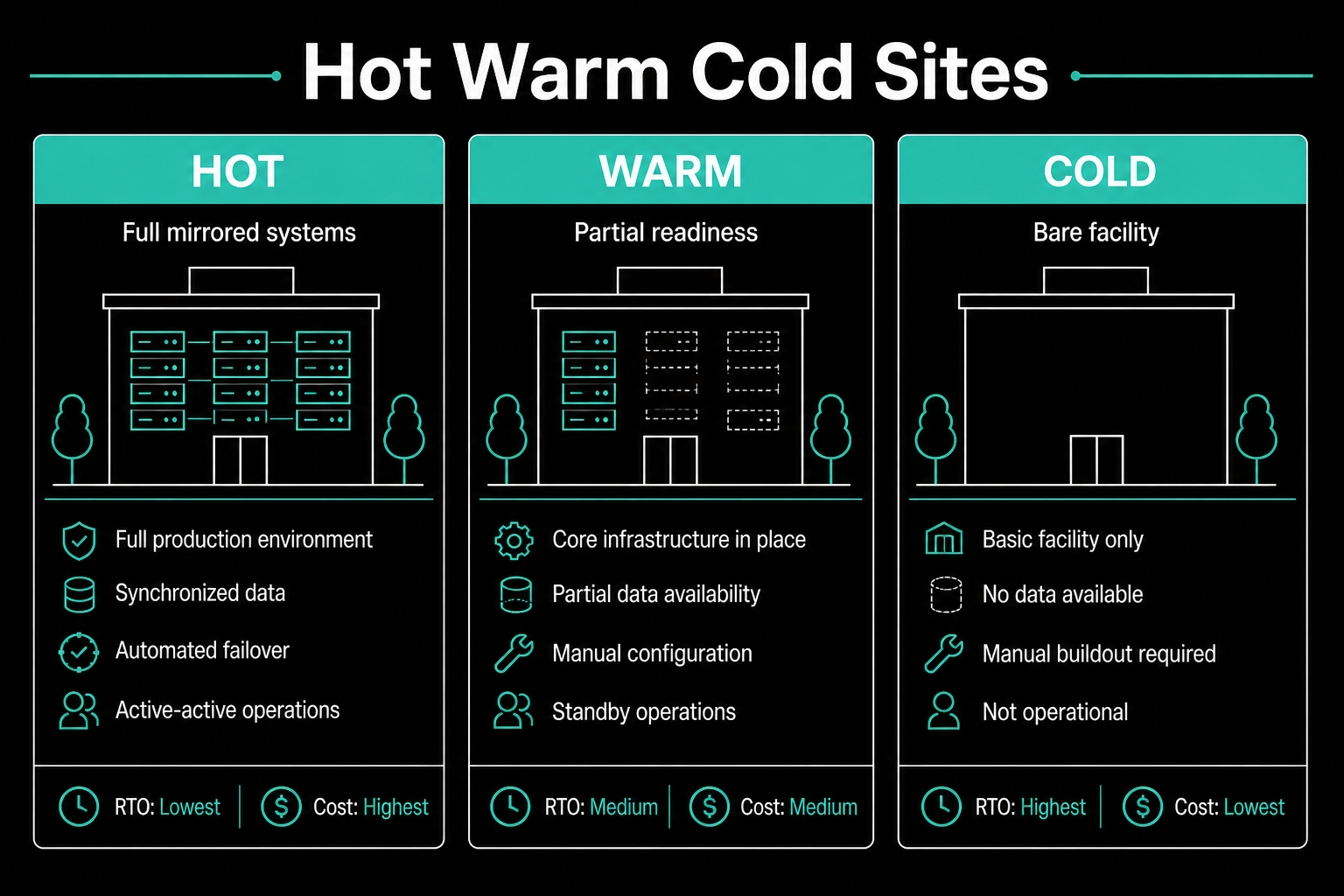
Two exam traps cluster around site questions. First, treating a hot site as equivalent to replicated backups: a hot site is operational infrastructure, and replication that mirrors encrypted files in real time propagates ransomware just as faithfully as legitimate data. Second, selecting a site tier based on cost alone: the right tier is the one whose recovery capability matches the RTO commitment from the BIA. A cold site with a 4-hour RTO requirement documented in the BCP is a governance failure wearing a budget rationale.
Backups as a security control
Backups defend against ransomware, accidental deletion, and corruption—but only when implemented with the security properties that SY0-701 now emphasizes. An untested backup is wishful thinking: you do not know whether restoration actually works, how long it takes, or whether the data is intact until you run a restore. A backup stored on the same domain as the systems it protects is a ransomware fast track—ransomware groups routinely enumerate and destroy backup infrastructure as part of their campaign before deploying the encryptor.
The 3-2-1 rule captures the minimum: three copies, on two different media types, with one copy offsite. Modern ransomware defense pushes further toward at least one immutable or offline copy—object storage with object lock enabled, tape physically disconnected from the network, or a snapshot tier that backup administrators cannot modify after creation. The credential boundary matters more than most teams acknowledge: ransomware operators routinely achieve domain-level access before deploying the encryptor, and shared domain trust means the backup NAS is reached by the same path as the file servers. Separate credentials, a separate management plane, or cloud-tier isolation with MFA-only access are the architectural answers the exam rewards.
Ransomware on Friday: a full scenario
Ransomware encrypts file servers at 6 p.m. on Friday. Nightly backups run to a NAS on the same Active Directory domain. Snapshots are visible and modifiable from standard file admin accounts.
The failures are architecture, not bad luck. Shared domain trust means ransomware that achieves domain-level access reaches the backup target by the same credential path. The nightly schedule means RPO is up to 23 hours. No immutable or offline tier exists, so the "restore from backup" option may itself have been encrypted. No tested restore procedure means nobody knows how long restoring three file servers actually takes—the answer may exceed the RTO commitment.
A strong response starts with network isolation before further encryption spreads. Preserve memory and disk evidence if legal or forensic requirements apply. Identify the last known-clean backup, confirm it predates the infection window, and run a test restore on one isolated server before mass recovery to verify integrity. Rebuild identity infrastructure if domain credentials were compromised—reimaging servers does not revoke credentials an attacker already holds. Reconnect systems only after patching the initial access vector and validating no persistence remains. Use the BCP contact tree to communicate status, not the potentially compromised email server.
The weak response is paying the ransom immediately or rebooting and hoping. Neither produces a clean state you could defend to an auditor, and neither closes the access path the attacker will reuse.
Exam traps summary
| Trap | Reality check |
|---|---|
| "Hot site means we have great backups" | Hot site is operational infrastructure; real-time replication can mirror ransomware instantly |
| "Replication counts as RPO coverage" | Real-time replication has no recovery point—you need point-in-time snapshots |
| "Clear wipe is fine for the returned lease drive" | Data leaving the org needs Purge or Destroy per SP 800-88 |
| "KMS and HSM are the same thing" | KMS manages lifecycle at scale; HSM provides tamper-resistant key storage—often combined, never identical |
| "RTO and RPO are both about time" | RPO is data-loss tolerance; RTO is downtime tolerance—mix them and you design the wrong backup frequency |
| "Cold site is fine if it's cheaper" | Site tier must match RTO commitment; cheap site with a 4-hour RTO is a governance failure |
| "SSD multipass overwrite works like HDD" | Wear-leveling defeats overwrites on flash; use cryptographic erase for SSD purge |
| "Encrypt everything" solves data minimization | Encryption protects confidentiality; it does not reduce unlawful collection |
| "Backups exist so ransomware is manageable" | Only if they are immutable, isolated from the domain, and tested—none of those is automatic |
Closing frame
Data protection and resilience are not separate domains stapled together—they are the same story told at different timescales. Classification tells you what matters. Encryption, DLP, and key management protect it while it lives. NIST SP 800-88 handles disposal when hardware retires. RTO and RPO translate business tolerance into backup frequency and site tier. Immutable backups with tested restores turn a ransomware event from an extinction threat into a documented recovery.
Companion reading: the incident response and vulnerability management post for what happens in the hours after detection fires, and the IAM, monitoring, and hardening post for the identity and logging controls that sit upstream of data access.